Bill of materials
Bill of materials of the heat network: evaluate pipe lengths, fittings and consumers in tables, group them and export them as CSV
Overview
The bill of materials compiles the quantities of the heat network in tables: pipe lengths per pipe type, number of fittings per type and dimension, as well as a consumer list with connection loads and connection lines. The tables can be grouped, sorted, copied to the clipboard and exported as CSV - as a basis for tendering, cost estimation and material procurement.
Opening
- Menu Network > Bill of materials …
- alternatively the
 Bill of materials … button in the Pipes tab of the network properties window
Via the Network: selection list at the top the network to be evaluated is chosen (this also sets the active network of the project). The dialog updates automatically when the network geometry in the project changes.
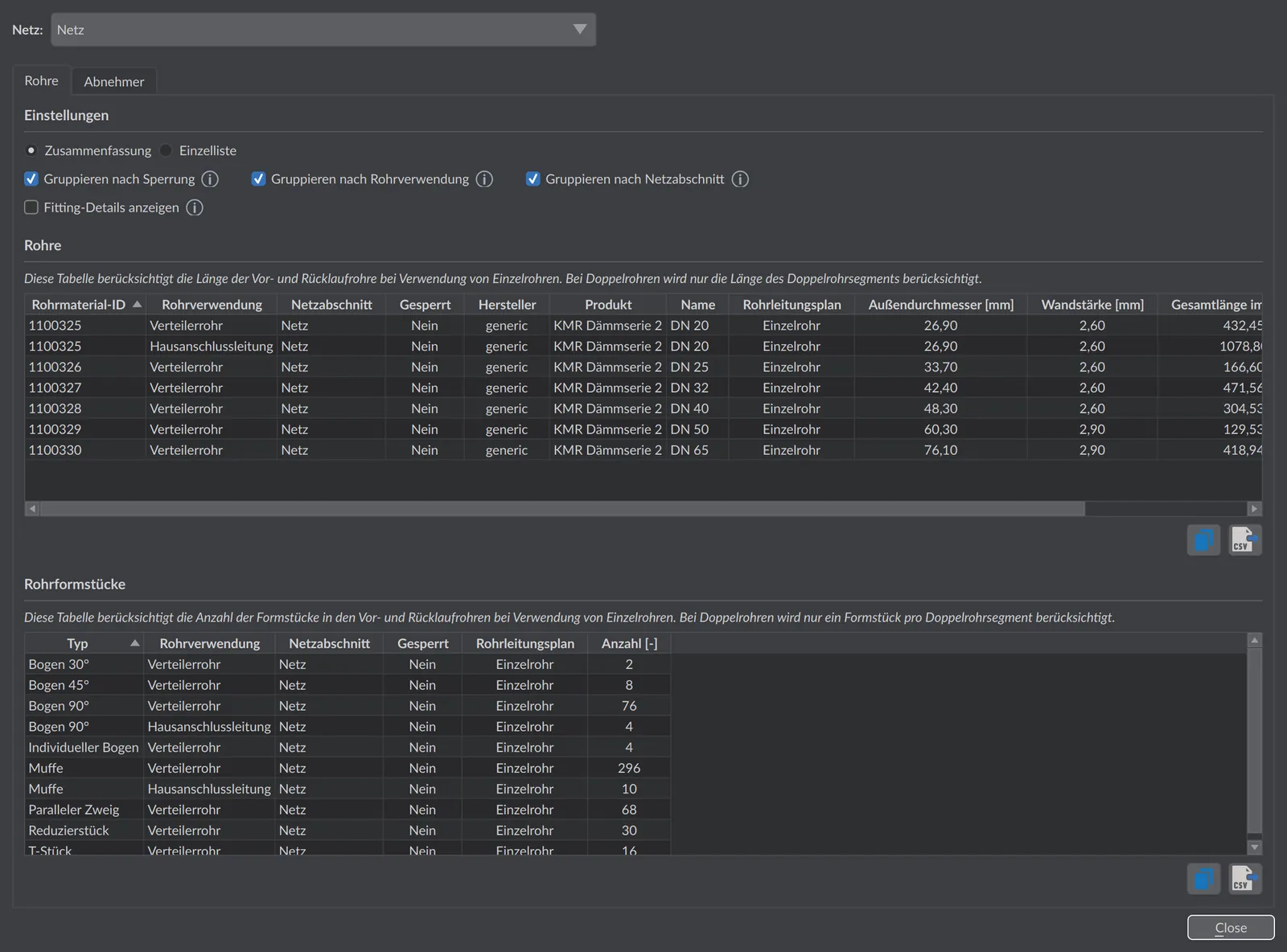
Display options
In the Settings section, two display modes and several grouping options are available:
| Option | Default | Meaning |
|---|---|---|
| Summary | selected | Combines identical pipe types or fitting types into a single row with total length or total count. |
| Itemized list | - | Lists each pipe section or each fitting individually with ID. |
| Group by locking | on | Reports pipes locked for sizing in separate rows - useful when existing lines are to be considered separately from pipes to be newly laid. |
| Group by pipe usage | on | Separates the rows by usage type (e.g. distribution pipe, house connection line); when disabled, all usages of the same pipe type are combined. |
| Group by network section | on | Reports the lengths separately per network section (partition). Network sections arise when previously independent networks are merged into one network via Assign to current network; each part keeps the name of its origin network. If the sub-networks are modeled e.g. per construction phase or supply zone, the quantities can be reported separately. |
| Show fitting details | off | Extends the fitting table by manufacturer, product and the inlet/outlet diameters of each fitting; when disabled, fittings are combined by type only. |
All tables can be sorted by clicking on the column headers; number columns are sorted numerically.
Practical tip
For a reliable bill of materials, first run the pipe sizing - only then do the routes carry real pipe types and the fittings are up to date. With Group by locking you separate existing lines from pipes to be newly laid, so that only the quantities actually to be procured enter your cost estimation. Via Export all tables land as CSV directly in your spreadsheet application.
Pipes table
The Pipes tab lists the pipe lengths of the network. In the summary the table contains per row: pipe material ID, optionally pipe usage, network section and lock status (depending on the grouping), manufacturer, product, name, pipe arrangement (single/twin pipe), outer diameter [mm], wall thickness [mm], total length in the network [m] and fluid volume [l]. In the itemized list the pipe section ID of the individual pipe section with its length [m] takes the place of the pipe type.
For single pipes, supply and return enter the length separately; for twin pipes only the length of the twin pipe section is counted. In addition to the routes, the in-house installation pipes of the transfer stations are taken into account, provided their pipe length is defined in the plant configuration.
Pipe fittings table
The Pipe fittings tab counts the fittings of the network. In the summary the table contains: type (e.g. Bend 90°, tee, reducer), optionally pipe usage, network section and lock status, pipe arrangement as well as count [-]. With Show fitting details, manufacturer, product, main diameter [mm], branch/reduced diameter [mm] and through diameter [mm] are added; the itemized list adds the node ID of each fitting.
For single pipes, fittings are counted separately in supply and return; for twin pipes one fitting is applied per twin pipe section.
Consumers table
The Consumers tab lists all transfer stations with:
| Column | Meaning |
|---|---|
| ID / Name | Identifier and display name of the consumer node |
| Plant | Assigned plant configuration of the transfer station |
| Connection load [kW] | Installed connection load |
| Heating power [kW] | Maximum heating power from the building demand |
| Connection line DN [mm] | Dimension of the house connection line |
| Connection line length [m] | Length of the house connection line |
Export
Each tab has its own buttons:
 Copy copies the table to the clipboard, e.g. for pasting into a spreadsheet application.
 Export saves the table as a CSV file.